

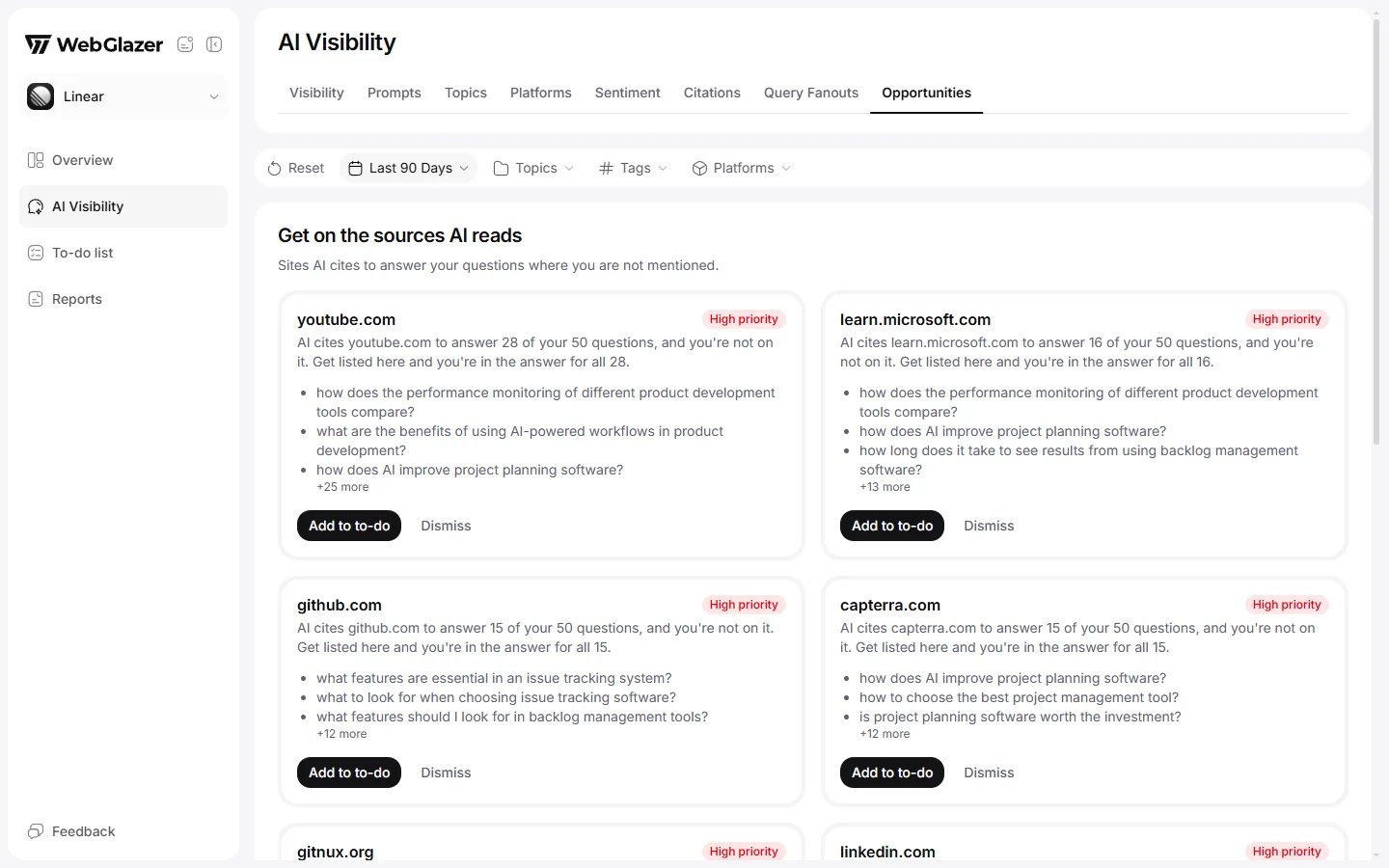
Sample data based on a linear.app project
Which sites become an opportunity
A cited site shows up here only when all of these are true:- It is a qualifying source: cited by 3 or more engines across 3 or more non-branded prompts in the period. See Citations.
- It is not your own site and not the site of a competitor you declared.
- At least one of its pages has been checked, and no checked page names you.
What a card shows
- The site (its host name).
- Priority: High priority when the site is cited for 10 or more of your questions, Medium priority otherwise.
- Why: a sentence such as “AI cites example.com to answer 4 of your 25 questions, and you’re not on it. Get listed here and you’re in the answer for all 4.”
- The questions it feeds: the first 3, then “+N more”.
- Mentioned here instead: competitors you declared that AI named in the answers citing this site.
- “Back on your list: a newer run still shows this gap.” when you marked it done and a later run cites the site again while it still does not name you.
Acting on a card
- Add to to-do: moves the card to your To-do list (in the sidebar), where you mark it Done or Remove it. See To-do list.
- Dismiss: hides the card. To bring a dismissed card back, open To-do list > History and click Reopen.