

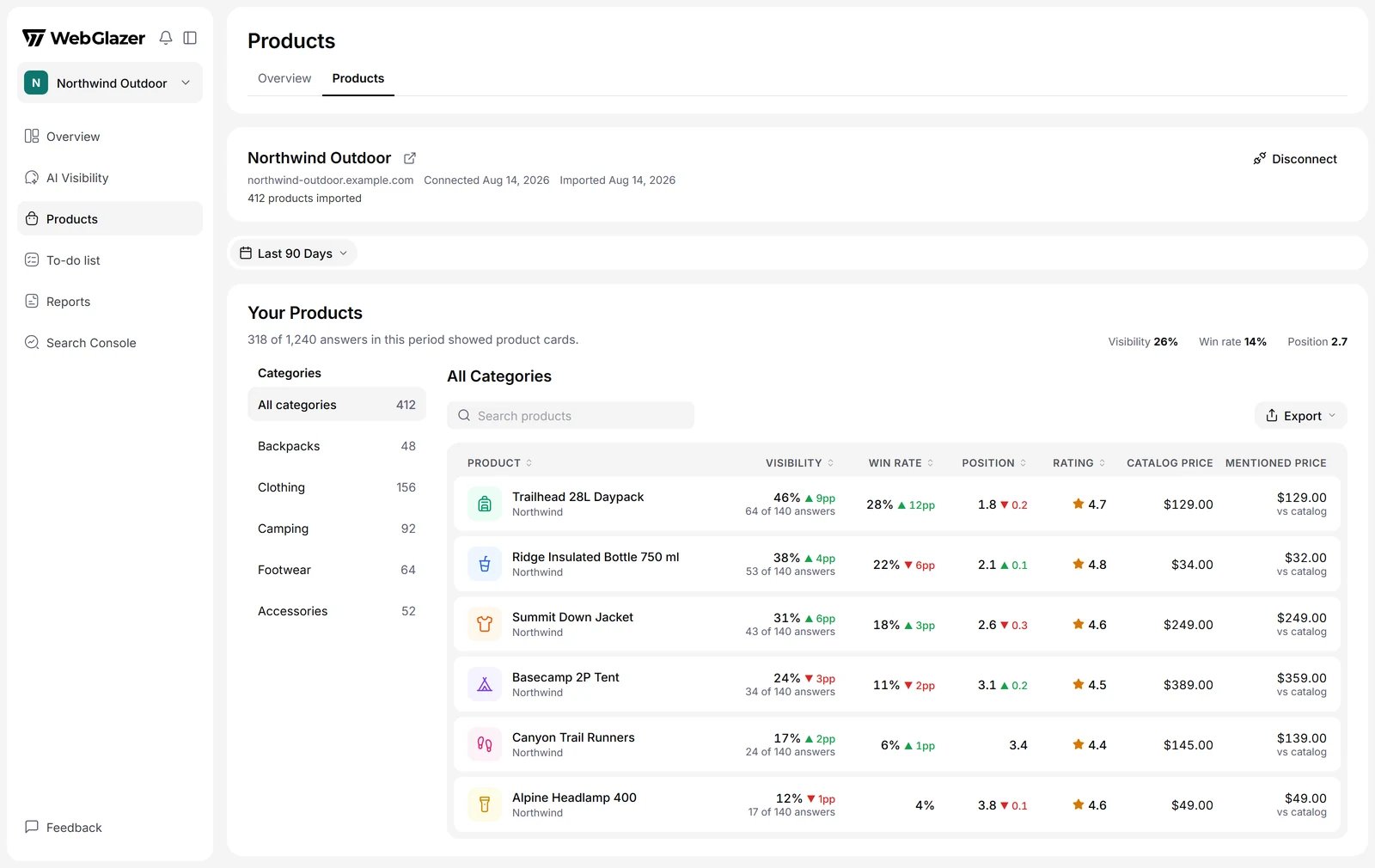
Illustration with sample data
Who has Products
Products is included in the Standard, Advanced and Agency plans, and in the Basic trial. A paid Basic plan has no Products. Without access there is no Products item in the sidebar, and a connected AI agent cannot read product data either. If you lose access, your imported data is kept and shown again when access returns.Connect your Shopify store
1
Open Products
Click Products in the sidebar, right below AI Visibility.
2
Enter the store address
Under Connect your Shopify store, check the store address. It starts filled with your brand’s website.
3
Connect
Click Connect store. WebGlazer reads the store’s public product feed, so there is nothing to install in Shopify.
- One store per brand.
- The first 1,000 products in the store are tracked. Click View untracked products to see the ones that are not.
- Password-protected stores and stores with bot protection cannot be imported.
Where product numbers come from
WebGlazer reads the shopping product cards that AI engines show when they answer your prompts, and matches each card to a product in your catalog. Product numbers update after each daily run. If none of your prompts got an answer with product cards, the page says No product cards yet.Overview tab
Products > Overview sums up the period chosen in the filter bar:- Brand Visibility: how often each brand shows up in the product cards of your shopping answers, over time, with a Top Brands table. Your own brands are tagged You.
- Performance by Visibility: your products AI shows most and least.
- Shopping Queries: the shopping searches AI ran to pick the products in its answers.
- Query Fanouts: the web searches AI ran while writing your shopping answers.
- Merchants: the shops AI points shoppers to in its product cards.
- Sources: the websites AI read while answering your shopping prompts.
Products tab
Products > Products lists every tracked product with:- Visibility: the share of shopping answers to this product’s prompts that showed it.
- Win rate: the share of its appearances where the product was the first card.
- Position: its average card position. Lower is better.
- Rating, Catalog price and Mentioned price (the price AI quoted).
- Merchants, Competing brands and Competing products.
- Top shopping queries, Top query fanouts and Appearances.
A single product
Click a product to open its page. It shows:- How the product was matched, and a link to it in your store.
- Visibility & Win Rate over time and Competing Products.
- Position vs Competitors: where this product and its most frequent competitors sit in the product cards.
- Merchants, Sources, Shopping Queries and Query Fanouts for answers that showed this product.
- Prompts & Chats: the prompts and answers this product appears in, and where it came first.