

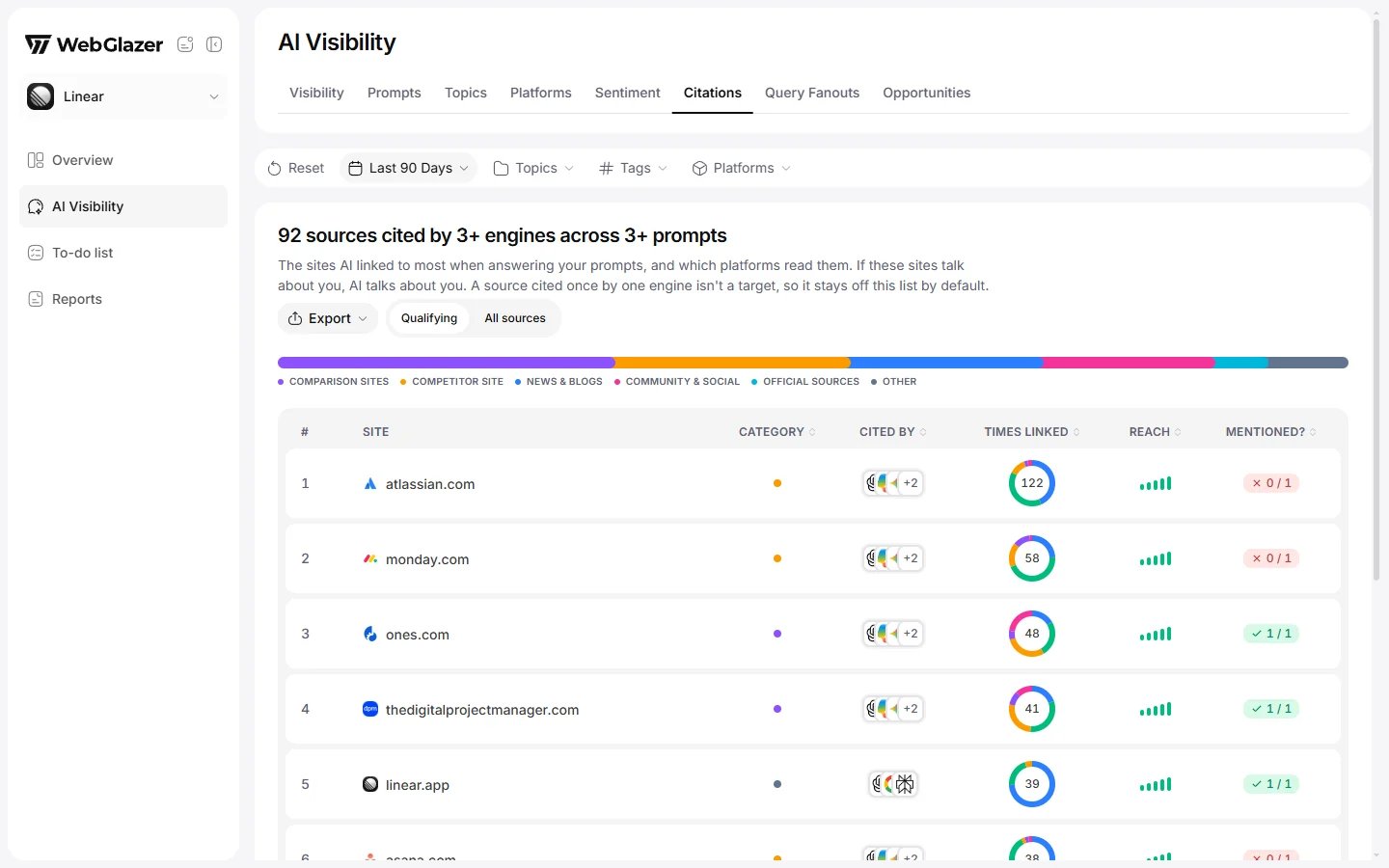
Sample data based on a linear.app project
Qualifying or All sources
A toggle in the top corner switches the list:- Qualifying (the default): sources cited by 3 or more engines across 3 or more prompts. The title reads, for example, “24 sources cited by 3+ engines across 3+ prompts”. A source cited once by one engine is not a target, so it stays off this list.
- All sources: every cited source, including the ones cited once by a single engine. The title reads, for example, “130 sources cited at least once”.
Category bar
A bar above the table splits all citations by kind of site, for example News & blogs, Comparison sites or Your site, each with its share. It shows up to 5 of the biggest categories and rolls the rest into Other. Each row’s dot in the table uses the same colors.The source table
How each column is counted is on the Citations metric page.
- Click a column header to sort. Each click cycles ascending, descending, off, and you can stack sorts. The # rank stays with each source.
- Export downloads the table as CSV or JSON with Site, Category, Cited by, Times linked, Reach (topics) and Mentions you.
- All numbers cover every run in the selected period, with the topic, tag and platform filters applied.
Source detail
Click a site to open its detail. The header reads, for example, “The 5 pages AI opened here when answering about you”.- Coverage: a pill and a line such as “Mentioned on 2 of 5 checked pages”. For your own site it says there is no mention to check.
- Named alongside: how many AI answers named you next to this source. This counts the answers, not the page itself.
- Pages: the checked pages, with Opens (how often AI opened each). Show all N pages lists every cited page with a Mentioned? verdict per page, and a search box.
- Check more pages: shows in the Show all N pages view. It reads pages WebGlazer could not open on its own, so their mention verdict can be filled in. Each check reads up to 20 pages.
- Each person can run 20 checks a day. The count resets at midnight UTC. It is the same on every plan and does not use your prompts or credits.
- At the limit you see “Daily limit reached. You’ve used all of today’s page checks, so try again tomorrow.”
- Members and Company Admins can run checks. Viewers cannot.